How to Manage a Private TikTok Account: A Comprehensive Guide
By Emma Valentine
TikTok has become one of the most popular social media platforms globally, with millions of users sharing their content daily. However, not everyone wants their content to be visible to the public. For users who prefer privacy, setting up a private TikTok account is an excellent option. This guide will provide you with all the necessary information about private TikTok accounts, including how to set one up, its advantages, and tips for managing it effectively.
TikTok is no longer just a platform for teenagers dancing to the latest trends. It has evolved into a powerful tool for content creators, businesses, and individuals alike. Whether you're using TikTok for personal or professional purposes, having control over who sees your content is crucial. A private TikTok account allows you to share your videos with only those you choose, giving you greater control over your online presence.
In this article, we'll delve into everything you need to know about private TikTok accounts. From understanding what a private account entails to exploring its benefits and limitations, we aim to equip you with the knowledge to make an informed decision. Let's get started!
What is a Private TikTok Account?
A private TikTok account is a feature that allows users to restrict access to their profile and content. When you set your account to private, only approved followers can view your videos and engage with your content. This feature provides an additional layer of privacy and security for TikTok users who prefer not to share their content with the public.
Setting up a private TikTok account is simple, and it can be toggled on or off at any time. By switching to private mode, your profile will no longer appear in search results, and only people you approve as followers will be able to see your videos.
Why Choose a Private TikTok Account?
There are several reasons why users opt for private TikTok accounts:
- Privacy: Protect your personal life by controlling who can see your content.
- Security: Reduce the risk of unwanted attention or harassment from strangers.
- Exclusive Content: Share your videos with a select group of friends or family members.
- Peace of Mind: Enjoy using TikTok without worrying about your content going viral unintentionally.
For many users, the peace of mind that comes with knowing their content is only visible to trusted individuals is invaluable.
Steps to Set Up a Private TikTok Account
Setting up a private TikTok account is straightforward. Follow these steps:
- Open the TikTok app and log in to your account.
- Tap on your profile icon in the bottom-right corner of the screen.
- Tap the three horizontal lines in the top-right corner to access the menu.
- Select "Settings and Privacy" from the menu.
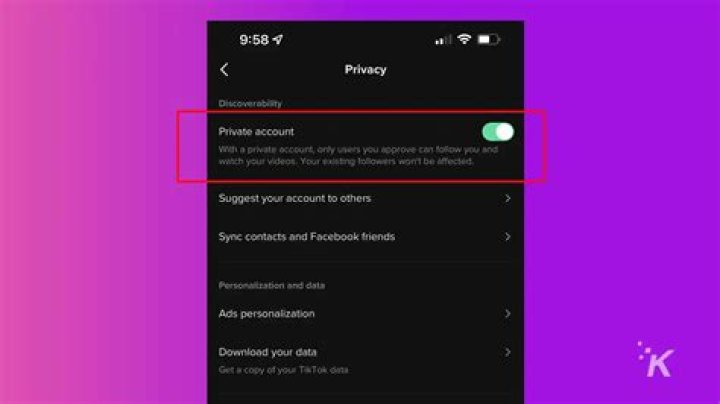
- Tap "Privacy" and scroll down to the "Account Privacy" section.
- Toggle the switch next to "Private Account" to turn it on.
Once you've completed these steps, your TikTok account will be set to private. Remember, you can always revert to a public account by toggling the switch off.
Advantages of a Private TikTok Account
Enhanced Privacy
One of the primary benefits of a private TikTok account is enhanced privacy. By restricting access to your profile, you can ensure that only people you trust can see your content. This is particularly important for users who prefer to keep their personal lives separate from their online presence.
Increased Security
A private TikTok account also offers increased security. By limiting who can view your profile, you reduce the risk of unwanted attention or harassment from strangers. This is especially beneficial for younger users or those who are more vulnerable to online threats.
Exclusive Content Sharing
With a private TikTok account, you can share your videos exclusively with a select group of followers. This allows you to curate your content for a specific audience, ensuring that only those who matter to you can enjoy your creations.
Limitations of a Private TikTok Account
Reduced Visibility
One of the main limitations of a private TikTok account is reduced visibility. Since your content is only visible to approved followers, it is unlikely to go viral or reach a wider audience. This can be a disadvantage for content creators or businesses looking to grow their following.
Delayed Engagement
Another limitation is delayed engagement. When someone requests to follow your private account, you must approve their request before they can view your content. This can slow down the process of building a community or engaging with new followers.
Tips for Managing a Private TikTok Account
Curate Your Followers
To make the most of your private TikTok account, curate your followers carefully. Only approve people you know and trust to ensure a positive and supportive community.
Engage with Your Followers
Even though your account is private, it's still important to engage with your followers. Respond to comments, messages, and duets to build a strong connection with your audience.
Post Consistently
Consistency is key when it comes to maintaining a private TikTok account. Regularly posting high-quality content will keep your followers engaged and interested in your profile.
How to Unblock a TikTok Account
If you accidentally block someone or decide to unblock them, follow these steps:
- Go to your profile and tap the three horizontal lines in the top-right corner.
- Select "Settings and Privacy" and then "Blocked Users."
- Find the user you want to unblock and tap the "Unblock" button next to their name.
Unblocking a user will allow them to see your public content again, but they will need to request to follow your private account if applicable.
Common Questions About Private TikTok Accounts
Can I Switch Between Public and Private Accounts?
Yes, you can switch between public and private TikTok accounts at any time. Simply toggle the "Private Account" switch in your settings to change your account status.
Will My Followers Be Notified if I Make My Account Private?
No, your followers will not be notified if you make your account private. However, they will no longer be able to see your content unless they request to follow your private account and are approved.
Can I Still Use TikTok Features with a Private Account?
Yes, you can still use most TikTok features with a private account, including creating videos, using effects, and interacting with followers. However, some features, such as appearing in search results or being recommended to new users, will be limited.
Statistics and Studies on TikTok Privacy
According to a study by Statista, over 1 billion people use TikTok globally, with a significant portion of users prioritizing privacy. In fact, a survey conducted by Pew Research Center found that 64% of social media users are concerned about their online privacy. This highlights the importance of features like private accounts in ensuring user safety and security.
Additionally, TikTok has invested heavily in improving its privacy and security features, including the introduction of tools like two-factor authentication and account verification. These measures are designed to give users greater control over their online presence and protect their personal information.
Conclusion
In conclusion, a private TikTok account offers numerous benefits, including enhanced privacy, increased security, and the ability to share exclusive content with a select group of followers. While there are some limitations, such as reduced visibility and delayed engagement, the advantages often outweigh the drawbacks for users who prioritize privacy.
We encourage you to take action by setting up a private TikTok account if you haven't already. By doing so, you can enjoy a safer and more controlled online experience. Don't forget to leave a comment or share this article with your friends and family. For more tips and guides on TikTok, be sure to explore our other articles on the site.