
Mastering SSH Remote Behind Firewall: A Comprehensive Guide
By Matthew Harrington
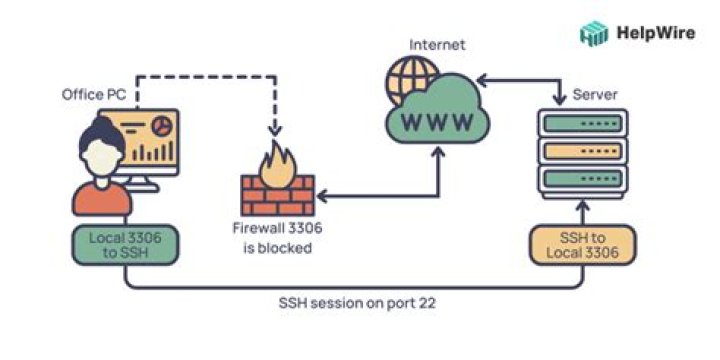
SSH (Secure Shell) remains one of the most powerful tools for remote administration and secure communication, even when working behind a firewall. Whether you're a system administrator, developer, or cybersecurity professional, understanding how to configure and use SSH in restricted network environments is essential. This guide will walk you through the complexities of setting up SSH remote connections behind firewalls, ensuring secure access to your servers and devices.
Firewalls are critical for network security, but they can also create challenges when trying to establish remote connections. Learning how to navigate these challenges without compromising security is vital for maintaining productivity and ensuring seamless operations. This article provides detailed insights into configuring SSH tunnels, port forwarding, and other techniques to maintain secure remote access.
By the end of this guide, you'll have a comprehensive understanding of SSH remote configurations, including advanced techniques for working behind firewalls. Let's dive in and explore how you can optimize your SSH setup for secure and efficient remote access.
Introduction to SSH
SSH, or Secure Shell, is a cryptographic protocol used to establish secure connections between a client and a server. It provides robust authentication and encryption, ensuring data integrity and confidentiality. SSH is widely used for remote administration, file transfers, and executing commands on remote systems.
One of the key features of SSH is its ability to operate over untrusted networks, making it an ideal solution for remote access scenarios. Whether you're managing servers from a home network or accessing systems in a corporate environment, SSH offers the tools needed to maintain secure communication.
However, when working behind firewalls, additional configurations may be necessary to ensure SSH connections remain stable and secure. Understanding these configurations is crucial for anyone looking to leverage SSH in a restricted network environment.
Firewall Basics
A firewall is a network security system that monitors and controls incoming and outgoing network traffic based on predetermined security rules. Firewalls act as a barrier between trusted and untrusted networks, protecting internal systems from external threats.
There are several types of firewalls, including packet-filtering firewalls, stateful inspection firewalls, and application-level gateways. Each type operates at different layers of the OSI model, offering varying levels of security and control.
When configuring SSH behind a firewall, it's important to understand how firewalls filter traffic and what rules may need to be adjusted to allow SSH connections. This section will explore common firewall configurations and their impact on SSH.
SSH Behind Firewall
Establishing SSH connections behind a firewall requires careful planning and configuration. Firewalls often restrict access to specific ports, which can complicate remote access. To overcome these restrictions, several techniques can be employed, including port forwarding and SSH tunneling.
Port Forwarding
Port forwarding allows you to redirect traffic from one port to another, enabling SSH connections through firewalls. By configuring your router or firewall to forward traffic on a specific port to your SSH server, you can maintain access without exposing your server to unnecessary risks.
- Identify the port number your SSH server is using (default is 22).
- Configure your firewall or router to forward traffic on this port to your server's internal IP address.
- Test the connection to ensure traffic is being forwarded correctly.
SSH Tunneling
SSH tunneling involves creating a secure connection between a client and a server, allowing traffic to pass through a firewall as if it were local traffic. This technique is particularly useful when accessing services behind firewalls that block direct connections.
For example, you can use SSH tunneling to access a web server behind a firewall by forwarding traffic from a local port to the server's internal port. This ensures that all communication is encrypted and secure, even when traversing untrusted networks.
Configuring SSH
Proper configuration of your SSH server is essential for maintaining secure connections. This includes setting up key-based authentication, disabling password authentication, and configuring firewall rules to allow SSH traffic.
Key-based authentication enhances security by requiring users to authenticate with a private key instead of a password. This method significantly reduces the risk of brute-force attacks and unauthorized access.
Additionally, consider using non-standard ports for SSH connections to reduce the likelihood of automated attacks targeting default ports. While this won't eliminate all risks, it can help deter less sophisticated attackers.
Security Best Practices
When working with SSH behind firewalls, adhering to security best practices is crucial. This includes regularly updating your SSH server, monitoring logs for suspicious activity, and implementing intrusion detection systems.
Limiting access to SSH servers by IP address or subnet can further enhance security. This ensures that only authorized devices can establish connections, reducing the attack surface.
Regularly review and update your firewall rules to reflect changes in network topology or security requirements. Keeping your configurations up-to-date helps maintain a secure environment and prevents potential vulnerabilities.
Troubleshooting
Even with proper configuration, issues can arise when setting up SSH behind firewalls. Common problems include connection timeouts, authentication failures, and blocked ports. To address these issues, consider the following troubleshooting steps:
- Verify that your firewall rules allow traffic on the specified SSH port.
- Check your SSH server logs for error messages or failed connection attempts.
- Test connectivity using tools like ping or telnet to ensure the server is reachable.
If problems persist, consult your firewall documentation or seek assistance from your network administrator to identify and resolve any configuration issues.
Advanced Techniques
For more complex scenarios, advanced techniques such as dynamic port forwarding and jump hosts can provide additional flexibility and security.
Dynamic Port Forwarding
Dynamic port forwarding allows you to use SSH as a SOCKS proxy, enabling secure access to multiple services through a single connection. This technique is particularly useful when working with applications that require access to multiple ports or services behind a firewall.
By configuring your SSH client to use dynamic port forwarding, you can route all traffic through the SSH connection, ensuring that all communication is encrypted and secure.
Jump Hosts
Jump hosts act as intermediaries between your local machine and the target server, allowing you to establish secure connections through firewalls or restricted networks. This technique is especially useful in environments where direct access to servers is not possible.
By configuring your SSH client to use a jump host, you can maintain secure access to your servers while adhering to network security policies.
Tools and Software
Several tools and software solutions can simplify the process of configuring SSH behind firewalls. Popular options include:
- OpenSSH: A widely used SSH implementation that provides robust security features and easy configuration.
- Putty: A popular SSH client for Windows users, offering a user-friendly interface and advanced configuration options.
- SSHuttle: A transparent proxy server that allows you to use SSH as a proxy, simplifying access to restricted networks.
When selecting tools, consider factors such as ease of use, compatibility with your operating system, and support for advanced features like dynamic port forwarding and jump hosts.
Case Studies
Real-world examples can provide valuable insights into the challenges and solutions associated with SSH behind firewalls. For instance, a large enterprise may use SSH tunneling to securely access internal servers from remote locations, while a small business might rely on port forwarding to maintain access to critical systems.
By studying these examples, you can gain a better understanding of how to apply SSH techniques in your own environment. Additionally, reviewing case studies from similar organizations can help identify potential pitfalls and best practices for maintaining secure connections.
Conclusion
Mastering SSH remote behind firewall configurations is essential for anyone working in a restricted network environment. By understanding the basics of SSH and firewall configurations, you can establish secure and efficient remote connections without compromising network security.
Remember to adhere to security best practices, regularly update your SSH server, and monitor logs for suspicious activity. Additionally, consider implementing advanced techniques like dynamic port forwarding and jump hosts to enhance flexibility and security.
We encourage you to share your thoughts and experiences in the comments section below. Your feedback helps us improve and provides valuable insights for other readers. For more information on SSH and network security, explore our other articles and resources.

![Decoding Movie Rules: Understanding & Enjoying Films | [Movierulz] & Beyond](https://silver.isevcloud.co.uk/uploads/3-movierulz-brings-the-latest-hollywood-movierulz-news-3movierulz-also-brings-movie-news-tv-news-trailers-reviews-movierulz-articles-in-south-ind-movies-are-more-than-just-a-form-of-entertainment-they-are-a-reflection-of-culture-storytelling-and-human-emotions-understanding-the-rules-that-govern-films-can-enhance-your-viewing-experience-and-provide-deeper-insights-into-the-narratives-presented-in-this-article-we-will-explore-the-five-essential-movie-rules-that-every-cinephile-should-know-before-movierulz-2025-latest-hd-telugu-kannada-tamil-south-indian-movies-web-series-shows-kdramas-watch-at-high-quality-on-movierulz-tv-this-page-is-intended-to-document-significant-changes-to-the-movie-rules-over-the-course-of-the-site-u2019s-history-this-is-far-from-a-complete-list-with-emphasis-being-placed-on-more-recent-rule-changes-standard-goals-based-on-di-u2026-understanding-movierules-is-essential-for-filmmakers-producers-and-even-audiences-these-regulations-impact-everything-from-the-production-phase-to-distribution-and-viewership-by-adhering-to-these-rules-filmmakers-can-navigate-the-complex-landscape-of-content-creation-ensuring-their-work-is-both-legally-compliant-and-culturally-sensitive-movie-show-times-schedules-and-tickets-in-los-angeles-long-beach-anaheim-santa-ana-irvine-burbank-lakewood-santa-monica-fountain-valley-orange-pasadena-ca-when-it-comes-to-enjoying-films-understanding-the-core-principles-that-govern-cinematic-storytelling-can-elevate-your-viewing-experience-significantly-the-5-movie-rules-com-framework-offers-a-set-of-guidelines-designed-to-help-both-filmmakers-and-audiences-appreciate-the-intricacies-of-modern-cinema-in-this-article-we-will-explore-these-five-essential-rules-and-this-combination-of-comfort-variety-and-free-access-makes-movierulz-profoundly-attractive-especially-for-viewers-on-a-tight-budget-the-dark-side-of-piracy-we-would-like-to-show-you-a-description-here-but-the-site-won-u2019t-allow-us-movierulz-com-movierulz-latest-bollywood-and-hollywood-movies-watch-online-full-free-movierulz-is-wide-range-collection-of-telugu-movies-tamil-malayalam-bengali-kannada-movierulz-movierulz-provide-a-wide-range-of-telugu-movies-tamil-malayalam-and-hindi-movies-watch-full-telugu-movies-online-anytime-anywhere-on-zee5-also-explore-41-telugu-movies-online-in-full-hd-from-our-latest-telugu-movies-collection-movies-are-more-than-just-a-form-of-entertainment-they-are-a-reflection-of-culture-storytelling-and-human-emotions-understanding-the-rules-that-govern-films-can-enhance-your-viewing-experience-and-provide-deeper-insights-into-the-narratives-presented-in-this-article-we-will-explore-the-five-essential-movie-rules-that-every-cinephile-should-know-before-movierulz-latest-featured-telugu-movies-watch-online-download-full-free-collection-of-bollywood-movies-tamil-malayalam-dubbed-kannada-5movierulz-movierulz-is-a-piracy-website-that-leaks-the-tamil-telugu-kannada-hindi-movies-and-allows-users-to-download-movies-in-free-check-out-the-latest-news-and-updates-on-meta-movierulz-here-enjoy-watching-new-telugu-movies-release-of-2025-experience-the-latest-and-new-south-indian-movies-on-your-mobile-device_720.jpg)

